
Zettlr LogoZettlr Documentation
Setup
Troubleshooting
FAQ
  • About Zettlr
  • Download Zettlr
  • GitHub
  • English
  • Español
  • Deutsch
  • Français
  • Italiano
  • 日本語
  • Português
  • Русский
Setup
Troubleshooting
FAQ
  • About Zettlr
  • Download Zettlr
  • GitHub
  • English
  • Español
  • Deutsch
  • Français
  • Italiano
  • 日本語
  • Português
  • Русский
  • Welcome
  • Getting started

    • Setup
    • Migrating from Obsidian
    • Migrating to a New Computer
    • Installing LaTeX
    • A Note on Security
    • Get involved
    • Troubleshooting
  • First Time Users

    • First Steps
    • Workspaces
    • Creating Files and Folders
    • Writing Markdown
    • Importing Word- and other Documents into Zettlr
    • Exporting Files
  • Interface

    • File Manager
      • Workspaces and Root Files
      • Choosing Which Files To Display
      • File Manager Appearance (Modes)
      • The File List
      • Properties
      • Filtering
      • Global Search
      • Projects
    • Split View
      • Document Tab Bar
      • Markdown Editor
      • Code Editor
      • Image Viewer
      • PDF Viewer
    • Sidebar
      • Table of Contents
      • References
      • Related Files
      • Other Files
  • Writing

    • Markdown Editor
      • Markdown Compendium
      • Appearance
      • Search
      • Autocomplete
      • Footnotes
      • Citations
      • Working With Comments
      • Status Bar
      • Table Editor
      • Text Transforms
      • Snippets
      • YAML Front Matter
    • Language & Style
      • Spellchecking
      • LanguageTool
      • Markdown Syntax
      • Autocorrect and Magic Quotes
      • Readability
    • Scientific & Technical
      • Math
      • Code Blocks
      • Mermaid Diagrams
      • Pomodoro Timer
      • Writing Statistics
    • Exporting
      • Exporting Workflow
      • Defaults Files (Profiles)
      • Selecting the PDF Engine
      • Assets Manager
      • Custom Templates and Reference Documents
      • Custom Commands
      • Printing and Previewing
      • Lua Filters
    • PKMS & Zettelkasten
      • The Zettelkasten method
      • Graph View
      • Tag Manager
  • Guides
    • Custom CSS
    • Reference Manager Integration
    • Setting up LanguageTool locally
    • Presentations
    • Submitting to a Journal using a LaTeX Template
    • Zettlr as a Portable App
  • Reference
    • Keyboard Shortcuts
    • Settings
    • Frequently Asked Questions

References

References

The references tab contains a bibliography of all the references you cite within the document. It is generated while saving your document and gives you a preview of your bibliography section. You can also select text in this panel which allows you to copy the references.
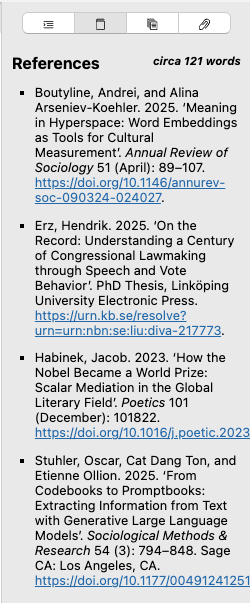
The sidebar with the second tab open, the references section

This list consists of any element that is cited somewhere in your document, plus the nocite elements. Any valid citekey that you place in a YAML frontmatter under the nocite key will be added to the bibliography, regardless of whether you actually cite the item in your main text, in agreement with how Pandoc will render your references.

To learn more about citing literature with Zettlr, take a look at the documentation page for citations.

Note

Please note that the references will be displayed using the built-in CSL style. If you have specified a custom CSL style, Pandoc will use that one during export. The references in the sidebar are for preview purposes.

Edit on GitHub
Last update: 8/18/26, 8:15 PM
Contributors: Hendrik Erz
Prev
Table of Contents
Next
Related Files
© 2017-2026 by Zettlr and Contributors