
Zettlr LogoZettlr Documentation
Setup
Troubleshooting
FAQ
  • About Zettlr
  • Download Zettlr
  • GitHub
  • English
  • Español
  • Deutsch
  • Français
  • Italiano
  • 日本語
  • Português
  • Русский
Setup
Troubleshooting
FAQ
  • About Zettlr
  • Download Zettlr
  • GitHub
  • English
  • Español
  • Deutsch
  • Français
  • Italiano
  • 日本語
  • Português
  • Русский
  • Welcome
  • Getting started

    • Setup
    • Migrating from Obsidian
    • Migrating to a New Computer
    • Installing LaTeX
    • A Note on Security
    • Get involved
    • Troubleshooting
  • First Time Users

    • First Steps
    • Workspaces
    • Creating Files and Folders
    • Writing Markdown
    • Importing Word- and other Documents into Zettlr
    • Exporting Files
  • Interface

    • File Manager
      • Workspaces and Root Files
      • Choosing Which Files To Display
      • File Manager Appearance (Modes)
      • The File List
      • Properties
      • Filtering
      • Global Search
      • Projects
    • Split View
      • Document Tab Bar
      • Markdown Editor
      • Code Editor
      • Image Viewer
      • PDF Viewer
    • Sidebar
      • Table of Contents
      • References
      • Related Files
      • Other Files
  • Writing

    • Markdown Editor
      • Markdown Compendium
      • Appearance
      • Search
      • Autocomplete
      • Footnotes
      • Citations
      • Working With Comments
      • Status Bar
      • Table Editor
      • Text Transforms
      • Snippets
      • YAML Front Matter
    • Language & Style
      • Spellchecking
      • LanguageTool
      • Markdown Syntax
      • Autocorrect and Magic Quotes
      • Readability
    • Scientific & Technical
      • Math
      • Code Blocks
      • Mermaid Diagrams
      • Pomodoro Timer
      • Writing Statistics
    • Exporting
      • Exporting Workflow
      • Defaults Files (Profiles)
      • Selecting the PDF Engine
      • Assets Manager
      • Custom Templates and Reference Documents
      • Custom Commands
      • Printing and Previewing
      • Lua Filters
    • PKMS & Zettelkasten
      • The Zettelkasten method
      • Graph View
      • Tag Manager
  • Guides
    • Custom CSS
    • Reference Manager Integration
    • Setting up LanguageTool locally
    • Presentations
    • Submitting to a Journal using a LaTeX Template
    • Zettlr as a Portable App
  • Reference
    • Keyboard Shortcuts
    • Settings
    • Frequently Asked Questions

Code Editor

Code Editor

The code editor works similarly to the Markdown editor, but for code files. As of now, Zettlr only supports three types of code files: JSON data files, YAML data files, and LaTeX source files.

The code editor allows you to comfortably edit the supported code files. It supports auto-indentation, syntax highlighting, and it always shows line numbers.

In addition, the code editor sports the same status bar as the main Markdown editor, if you activate it. The status bar shows you some information such as cursor position or linter results.
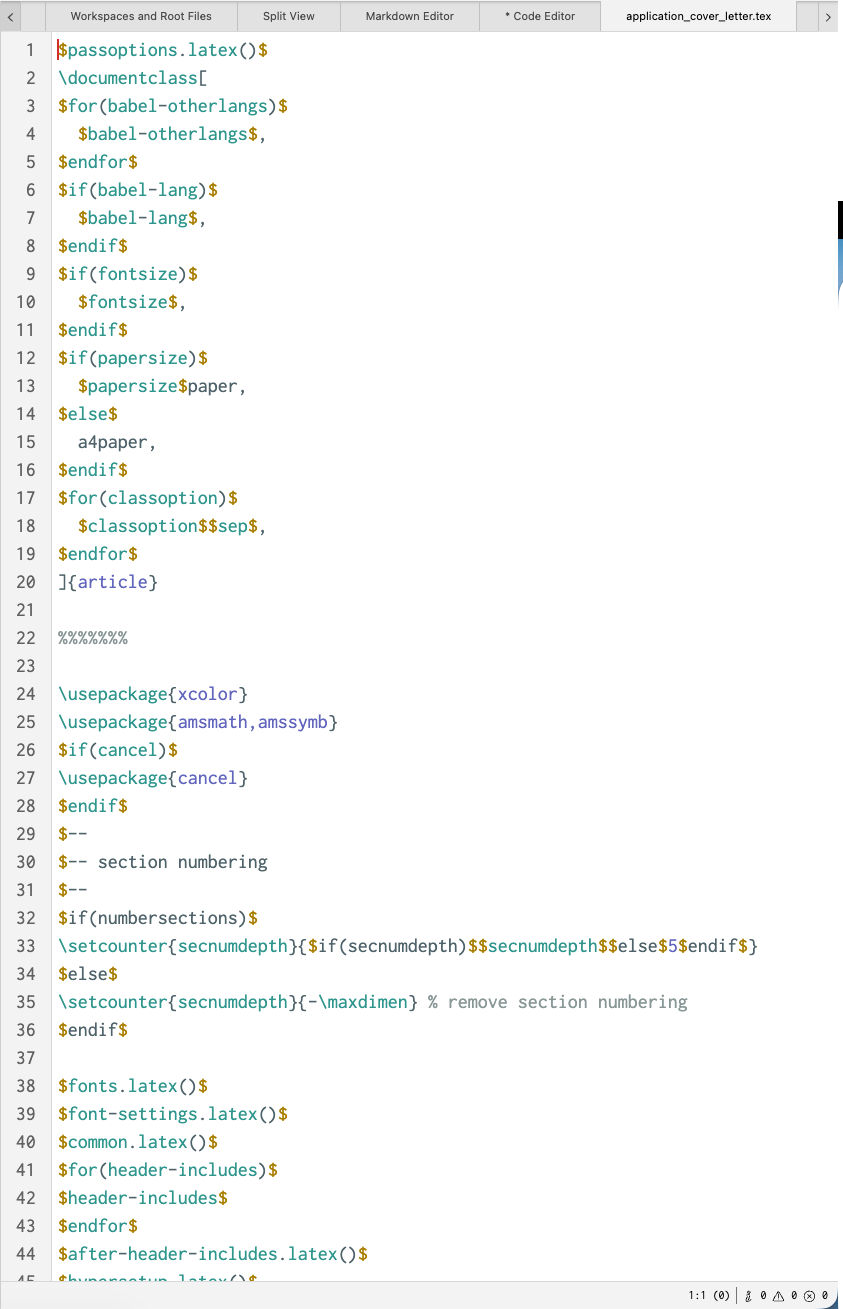
code_editor_example.png

Besides common features, the code editor also features a linter. A linter is a tool that checks your code for syntax errors, and highlights them for you.

This way you can quickly find and fix any errors in your files.

Edit on GitHub
Last update: 8/18/26, 8:15 PM
Contributors: Hendrik Erz
Prev
Markdown Editor
Next
Image Viewer
© 2017-2026 by Zettlr and Contributors